
Most business owners check their Google Business Profile once a month — or less. But Google doesn’t update on your schedule. It updated again in May 2026, and if you’re not tracking these changes, you’re handing visibility directly to your competitors who are.
Google Business Profile (GBP) has quietly evolved from a simple directory listing into one of the most sophisticated local marketing tools available — and completely free to use. But free doesn’t mean easy. With every major update, the gap widens between businesses that are actively managing their GBP and those that set it up once and forgot about it.
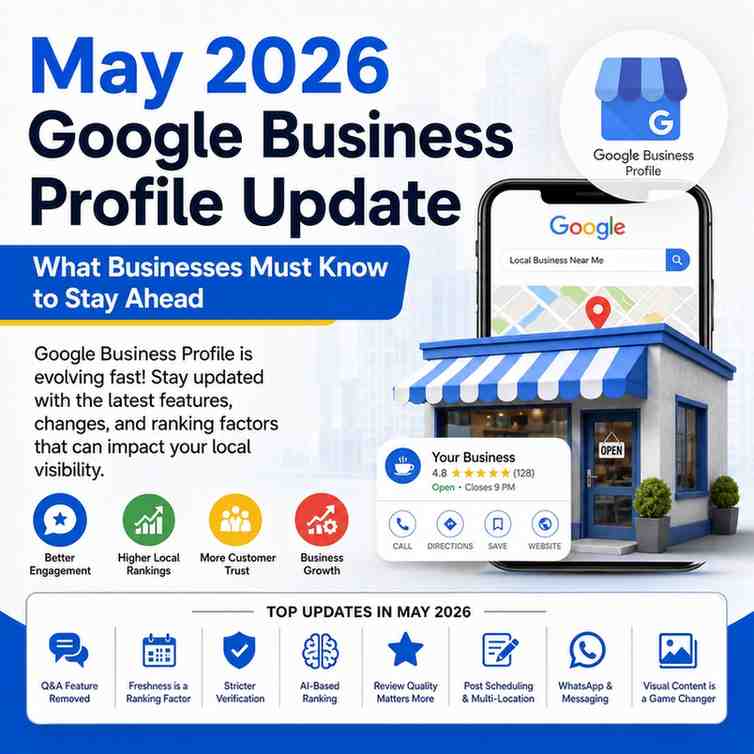
May 2026 brings a fresh wave of changes — some subtle, some significant. Here is a complete breakdown of what has changed, why it matters, and exactly what you should do about it.
1Your Gallery Photos Now Have a Ranking Order — And You Control It
Gallery Sorting Gets a Major OverhaulHigh Impact
Until now, the photos displayed on your GBP listing were sorted by Google’s algorithm — often surfacing blurry customer uploads or outdated images as your first impression. In May 2026, Google has introduced owner-controlled gallery sorting. You can now manually sequence which photos appear first, giving you direct control over the visual story your profile tells every potential customer.
What to do now: Audit every photo on your profile. Archive outdated or low-quality images. Upload a fresh set of high-resolution images — storefront, interior, team, and product/service shots — and arrange them in the order you want first-time visitors to experience your brand. Your cover photo and first three gallery images are what most people see before deciding to click.
2Google Is Now Fighting Review Extortion On Your Behalf
Automated Defenses Against Review ManipulationHigh Impact
A damaging pattern has emerged across local businesses in India and globally — competitors or bad actors leaving coordinated fake negative reviews, or customers threatening 1-star reviews unless given discounts. Google’s May 2026 update introduces AI-powered review authenticity detection, which proactively identifies and flags suspicious review patterns before they damage your profile’s rating. When reviews are removed due to policy violations, Google is now sending direct email notifications to business owners explaining what was removed and why.
What to do now: Enable email notifications in your GBP dashboard immediately. Monitor your review inbox weekly, not monthly. If you spot suspicious activity, use the new “Report a concern” tool under the Reviews section — it now connects directly to Google’s enforcement team rather than a generic support form.
3.The 30-Day Freshness Clock Is Real — And Ticking
Profile Inactivity = Visibility Drop High Impact
This is the update most businesses don’t know about until their rankings have already dropped. Google’s 2026 algorithm now factors profile freshness more aggressively than ever. Multiple local SEO reports confirm meaningful drops in GBP impressions for profiles that go 30 or more days without a new photo, post, or update. Google does not officially call it a “30-day rule” — but the behaviour in rankings is consistent and measurable.
What to do now: Set a weekly calendar reminder to post at least one update, photo, or offer on your GBP. It doesn’t need to be elaborate — a new project photo, a weekend offer, an event announcement. Consistency beats volume every single time.
4.Multi-Location Publishing Is Finally Here
Schedule & Publish Across All Locations At OnceNew Feature
Google has officially launched scheduling and multi-location publishing for GBP Posts. Businesses managing more than one location — whether you’re a retail chain, a real estate developer with multiple project sites, or a restaurant group — can now create a single post and push it across all profiles simultaneously. You can also schedule posts in advance, which means your GBP stays active even when your team is busy.
What to do now: If you manage multiple GBP locations, switch to bulk publishing immediately. Plan a 30-day content calendar of posts — updates, offers, events, and FAQs — and schedule them all in one sitting. This alone can dramatically reduce the time spent managing your local presence.
5.Q&A Is Being Replaced by AI-Powered Answers
Google Phases Out Static Q&A — Gemini Takes OverMedium Impact
Google has confirmed it is removing the traditional Q&A feature from Google Maps and replacing it with Gemini AI-powered responses. Instead of manually seeded Q&A, Google’s AI now generates answers to customer questions by pulling from your business profile, reviews, and website content. This means your website copy, your GBP description, and your review responses are now directly feeding the answers that potential customers see before they even visit your site.
What to do now: Rewrite your GBP business description with the top 5 questions your customers ask — naturally woven in as answers. Update your website’s FAQ page and ensure LocalBusiness schema markup is in place. Whatever Gemini “reads” from your digital footprint is what it will tell your next customer.
6.Interaction Signals Are the New Ranking Currency
Clicks, Views & Engagement Now Outweigh Brand ProminenceHigh Impact
One of the biggest algorithm shifts in 2026 is how Google now weights interaction signals over pure brand size. Photo views, review reads, Q&A clicks, website visits from your GBP panel — all of these now play a more active role in determining your local ranking position. A smaller brand with a highly engaged profile can now outrank a larger brand with a neglected one. This is a genuine levelling of the playing field.
What to do now: Open your GBP Performance tab and check your discovery ratio — the percentage of people finding you through category or service searches versus direct brand searches. If it’s low, your profile content isn’t pulling in new audiences. Fix your categories, refresh your description, and add service-specific photos to boost relevance signals.
“In May 2026, your GBP is not a listing — it’s a live marketing asset. The businesses treating it that way are pulling ahead in local search. Those ignoring it are giving away rankings they earned.”
Your May 2026 GBP Action Checklist
Here’s exactly what to action this week across all six updates:
- ✓Re-sort your gallery photos — put your best, most relevant images first
- ✓Enable GBP email notifications to catch review removals instantly
- ✓Set a weekly reminder to post at least one update, photo, or offer
- ✓If you manage multiple locations, set up bulk post scheduling now
- ✓Rewrite your GBP description to answer your top 5 customer questions naturally
- ✓Add LocalBusiness schema to your website so Gemini reads the right answers
- ✓Check your Performance tab — track discovery share, calls, and direction requests weekly
- ✓Upload at least 5 new photos this week and keep adding monthly
The Bottom Line
Google Business Profile in May 2026 rewards one type of business — the one that shows up consistently, engages authentically, and keeps its profile as current as its actual operations. The updates this month are not penalties for doing nothing. But if you are doing nothing, your competitors who are acting on these changes will simply take the Map Pack positions you should be in.
The good news is that every single update listed here is actionable today — no budget required, no agency needed for most of it. Open your GBP dashboard right now and start with step one: sort your gallery photos. That alone takes ten minutes and immediately improves your first impression for every person who finds you on Google.